Simple
Marketing campaign
Brief, creative, channels and launch, with a status for every asset.
- Review flow
- Channel and budget fields
Start with a board. Grow into critical path.
Critova runs any project for any team: boards and checklists for everyday work, timelines for bigger plans, and Primavera-grade scheduling, earned value and Monte Carlo risk when the stakes rise. In any country, language and currency.
Every feature, every plan, free during our launch. No card needed. How the launch works
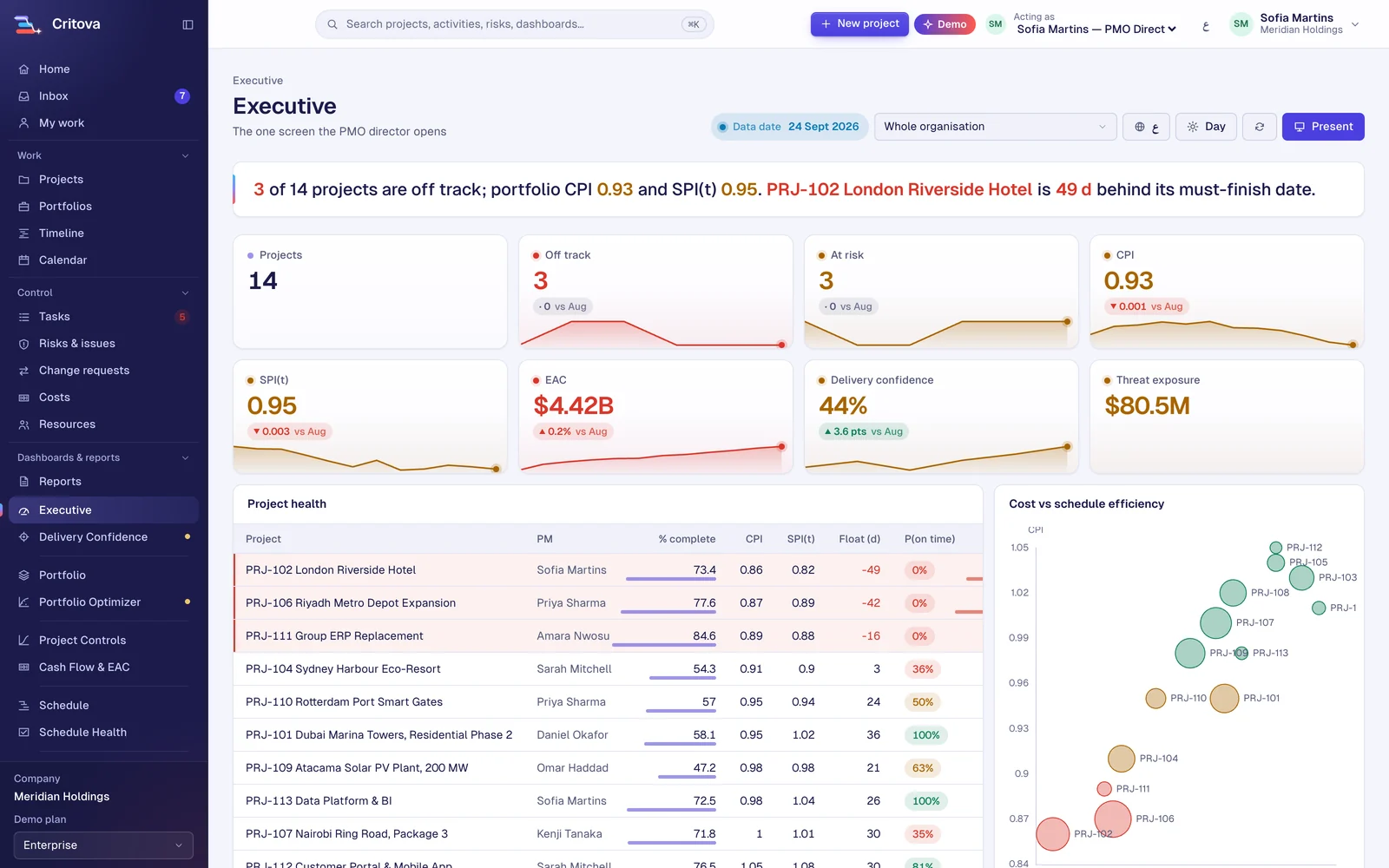
PRJ-102 London Riverside Hotel is 49 d late; 3 of 14 projects are off track and portfolio CPI is 0.93.
Bottom-left: over budget and late. Bubble size: budget.
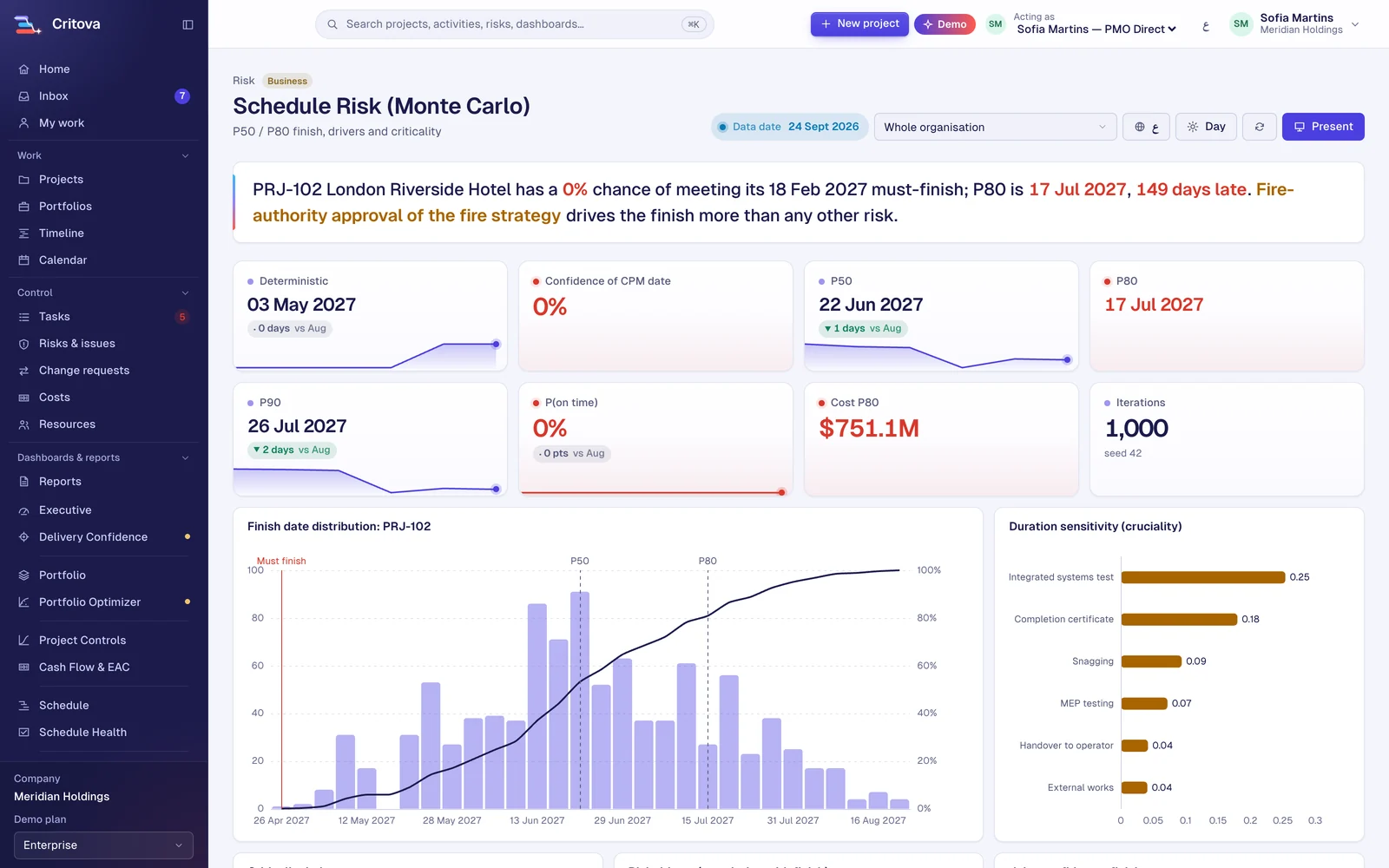
1,000 iterations, fixed seed, Latin Hypercube
Live demo data from Meridian Holdings, a sample company, as of 24 September 2026. Every figure is computed by Critova's engines.
One app, three levels
Every project starts where your team is. A board for a two-week campaign, a timeline for a product launch, full controls for a two-year build. Upgrade a project in place; nothing is lost and nothing is re-entered.
Marketing, HR, operations, agencies and any small project.
For example A campaign, an office move, a hiring round
Project managers running most business projects.
For example A product launch, an IT rollout, a client onboarding
PMOs, construction, engineering and teams leaving Primavera or Project Online.
For example A tower, a road package, an ERP programme
Pick a template, rename the statuses to match how your team works, add the fields you track, and invite people. Nothing to configure before you start.

Campaigns, launches and a content calendar on one board, with a status for every asset and a date for every channel.

Recurring processes, facility work and office moves that need a clear owner, a checklist and a date.

Hiring pipelines and onboarding plans that move candidates and new starters through the same steps every time.

A project per client, a board per deliverable and a timeline the client can follow, without a separate tool for each.

Rollouts, migrations and upgrades with waves, dependencies and a go-live date everyone can see.
Microsoft retired Project Online on 30 September 2026. Teams need somewhere to take their schedules, baselines and history.
Critova as a Project Online alternativeMarketing lives on one board, IT in a ticket tool and the big projects in a desktop scheduler. Critova puts all of them in one place, each at the level it needs, with one view for leadership.
Work-management tools are easy but have no critical path or earned value. Controls tools have the engines but are heavy and expensive. Critova is built to be both.
This is a real critical-path calculation running in your browser on a Monday to Friday week. Stretch Procurement past Permits and Foundations and see the critical path jump.
Critical path:
Drag the end of any bar, or focus a bar and press ← →
The Advanced level
Upgrade a project to Advanced and the same tasks become a critical-path schedule, with cost, risk and dashboards on top.
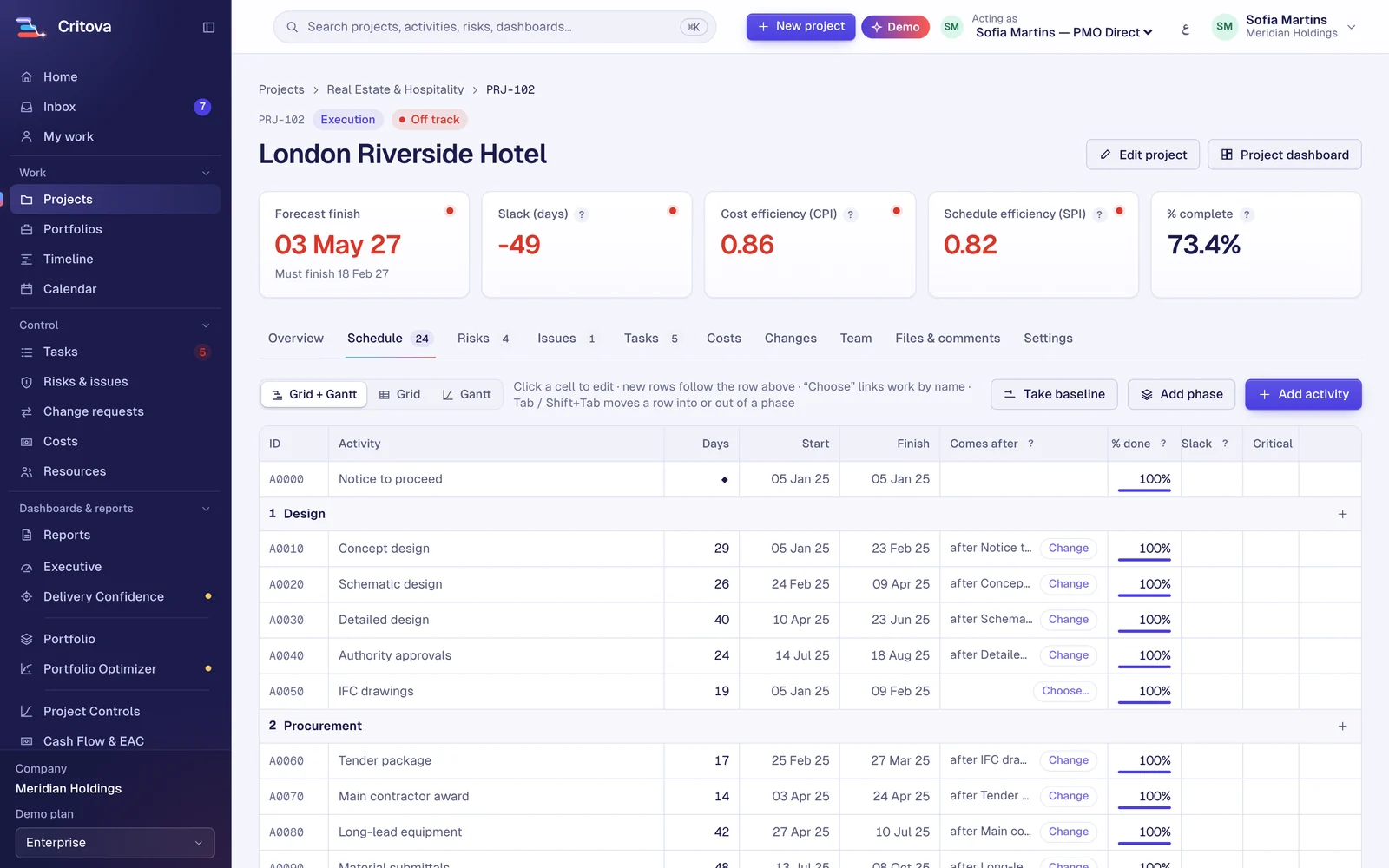
Type activities into a grid the way you would in Excel, or bring your Primavera or MS Project file. Links are picked by name, and Critova finds the critical path, the float and the finish date as you type.
Site teams update progress from their phones. Actual costs come in by entry or spreadsheet. Earned value, earned schedule and the forecast cost move with every update.
Log risks on a five by five matrix, run a Monte Carlo on the schedule, and see the P80 finish date. Change requests go through submit, approve or reject, and approval updates the budget and the committed date.
Eleven dashboards read the same numbers your team works in, so the steering committee sees today's truth. Present mode runs the meeting; the status report prints in Arabic or English.
Your whole portfolio when you sign in: ten live figures with their trend, the S-curve, health by portfolio, cash flow, risks and the projects that need you.
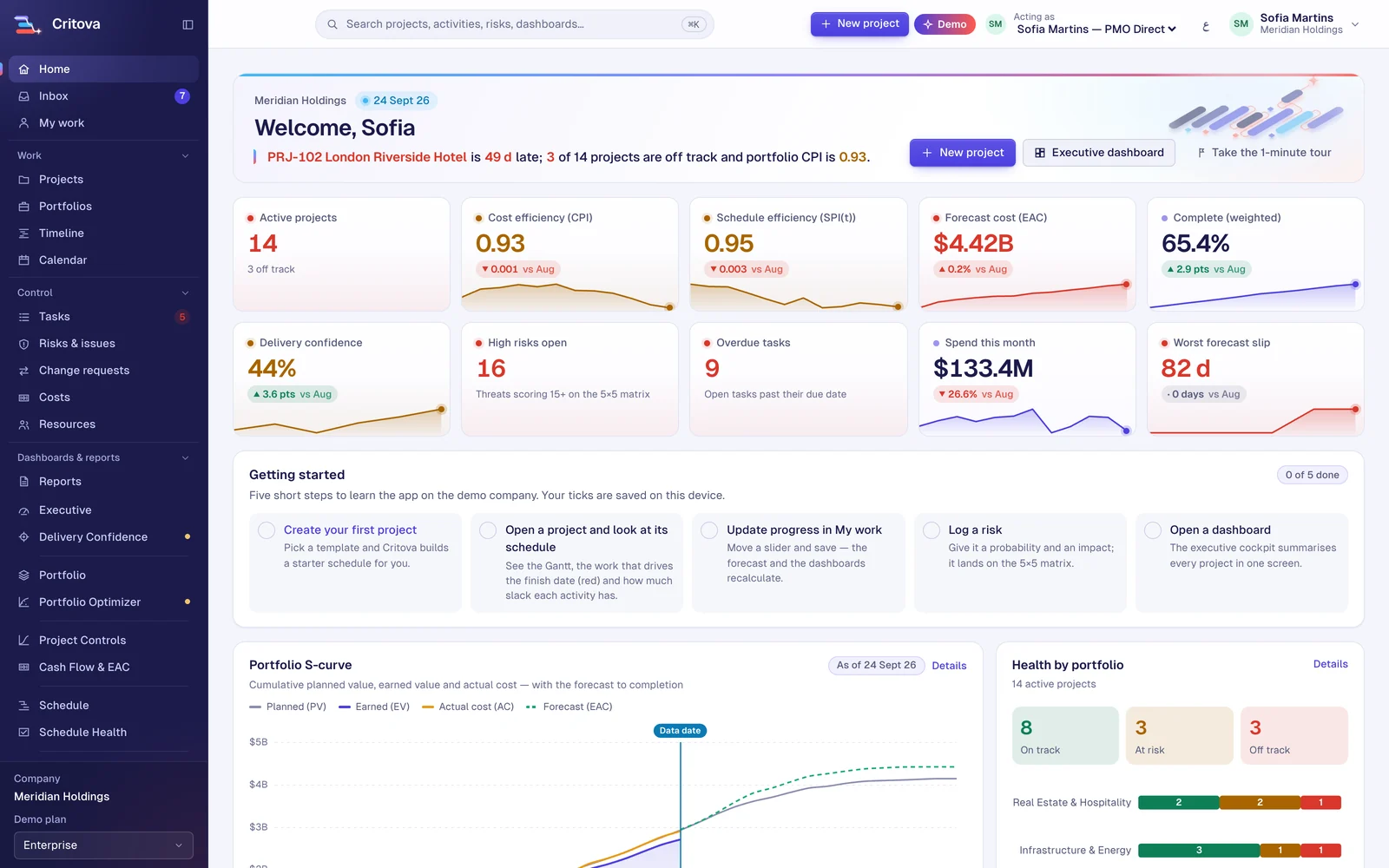
Every project's health, cost efficiency and exposure on one screen, with a headline that names the worst thing first.
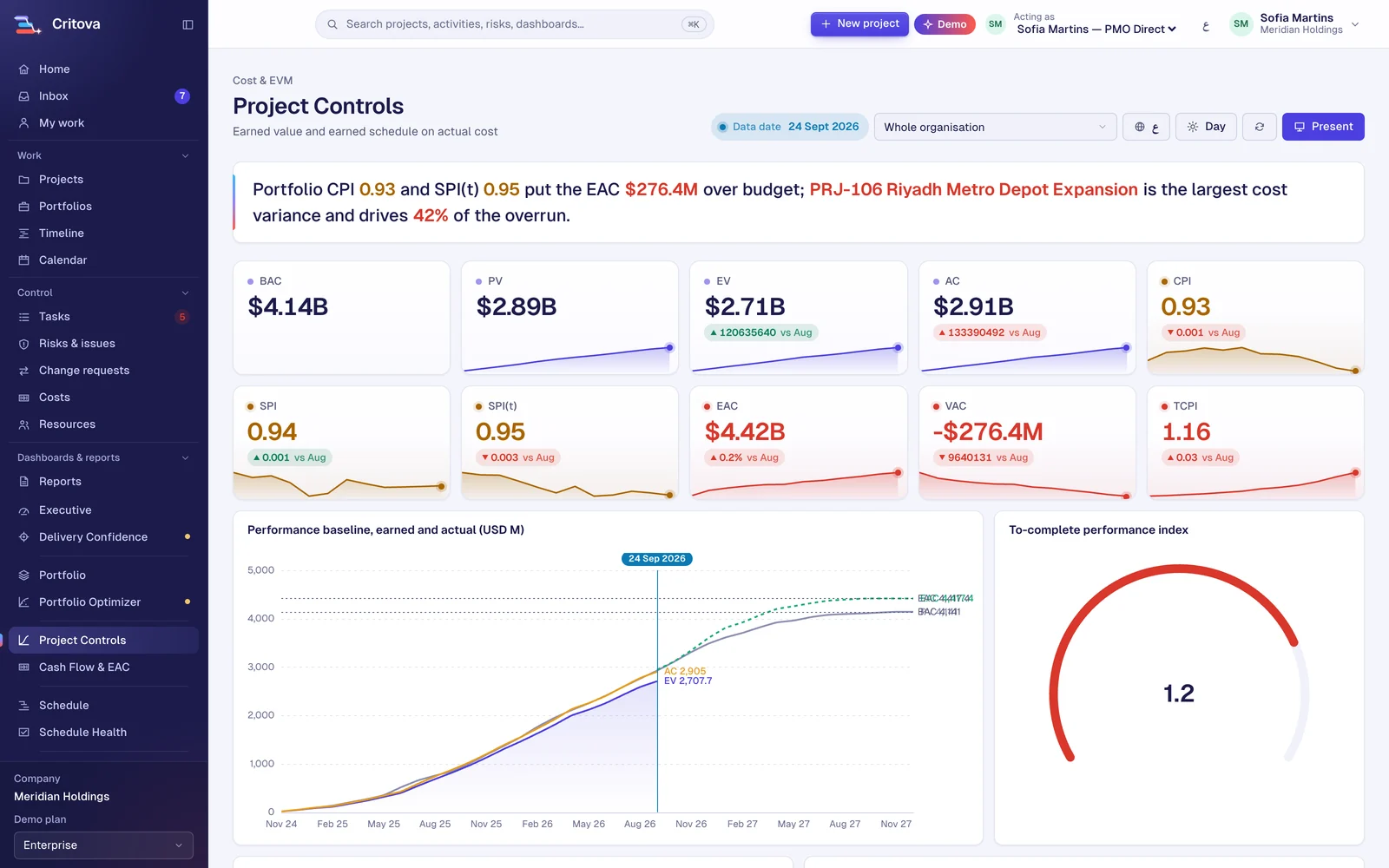
Earned value and earned schedule on real cost: CPI, SPI(t), EAC and TCPI with their trends, the S-curve and the drivers of the overrun.
The finish-date distribution, the P50 and P80 dates, and the activities that drive the risk.
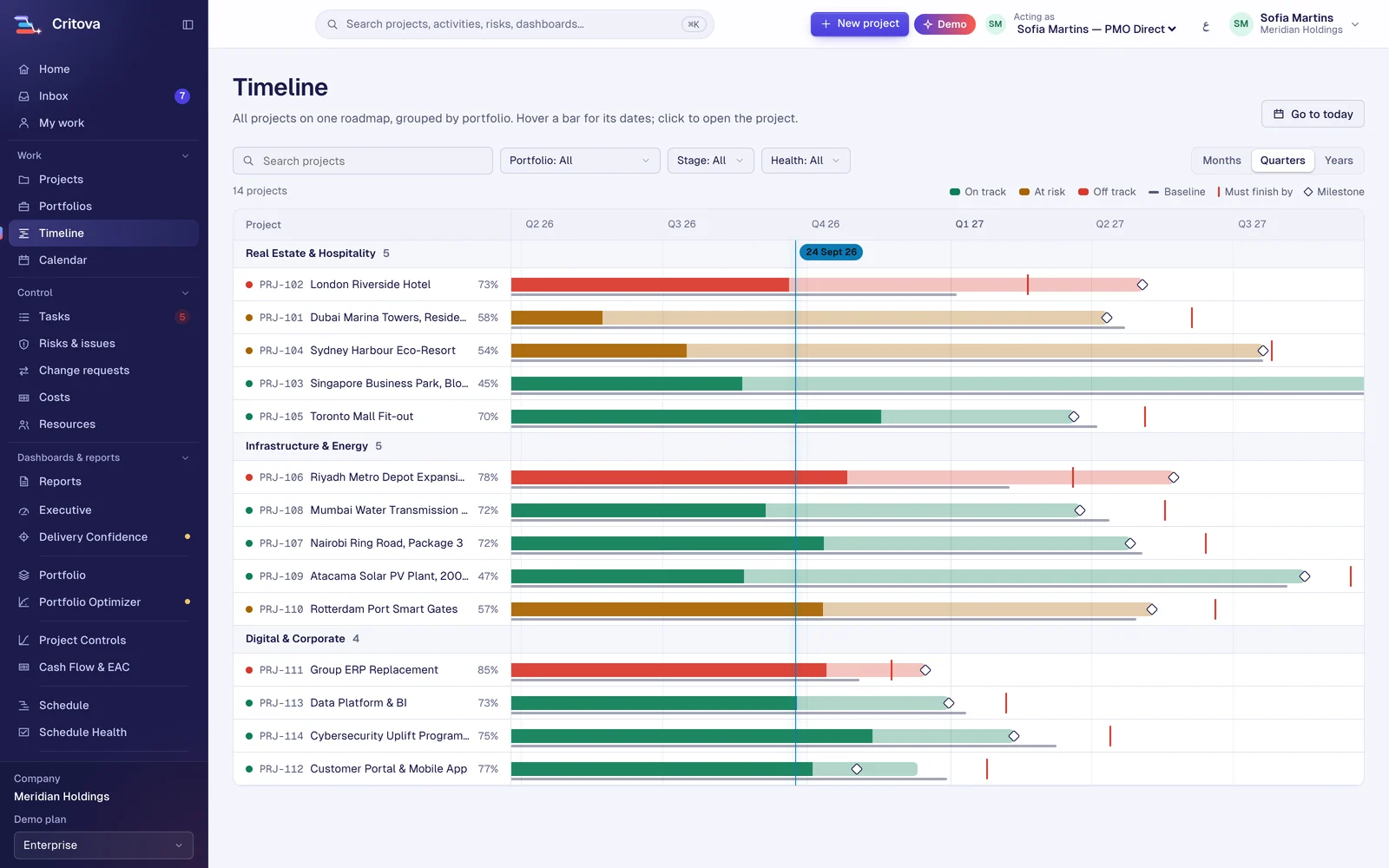
Every project on one roadmap, grouped by portfolio, with baselines, deadlines and today's line.
Every figure in Critova comes from a tested calculation engine, and every result prints its method: iterations, seed, sampling and the rule it applied. Here is a small Monte Carlo running live.
Method: 2,000 iterations, seed 42, triangular durations on five linked activities plus one risk event (30% chance, 5 to 20 days). Run in your browser.

Sign up with a work e-mail, name your company and choose your working week. Two minutes, no card.

Import MS Project, Primavera or Excel with a preview first, or start from a building, infrastructure or IT template.

Progress, cost and risk come in; the critical path, earned value and dashboards update on their own.

Twenty to two hundred projects in one view, one status format, and a board pack without the weekend of PowerPoint.

Real CPM, baselines, DCMA-14 checks, earned value and Monte Carlo, with P6 and MS Project files coming in and Excel going out.

A schedule that tells you what drives the date, a risk register people actually use, and tasks that do not get lost.

The same numbers the team works in, readable in a minute, with change requests to approve online. Viewers are free.

Thousands of activities, many contractors and a fixed handover date. Critova keeps one critical path, reads the contractors' P6 files and shows the P80 date the client will ask about.

Plants, grids, pipelines and shutdowns where a day of delay has a price. Critova shows which activities drive the energisation date and how likely you are to hit it.

Several towers, malls or communities at once, each with its own budget, sales dates and contractors. The portfolio view shows which one is eating the contingency.

You review the contractor's programme and report to the client. Critova checks schedule quality, analyses the critical path and turns it into a clear monthly report.

ERP roll-outs, platforms and cyber programmes with hard go-live dates. Critova keeps the plan, the budget and the risks in one place the steering committee trusts.

Programmes that report to leadership in a standard PMO format, with an audit trail for every change and strict rules about who sees what.
One workspace for offices in different countries, languages and currencies. Critova adapts to how your organisation works, not the other way round.

Critova runs predictive projects today, with more methods on the same schedule spine on the way.
Critical path, baselines, earned value and change control.
PRINCE2 as a project method with stages and tolerances; formal stage-gate voting is planned.
Must and should criteria, votes and baseline lock at each gate.
Sprints, velocity, cumulative flow and Monte Carlo 'when' forecasts on the same spine.
Project and feeding buffers with a fever chart.
Look-ahead plans, constraints and percent plan complete.
Import with a preview, export to Excel any time.
ERP and tool connectors, planned
Until connectors land, actual costs come in by entry or spreadsheet, which works with any ERP.
Launch offer
We would rather earn your PMO's trust than your card number. Use Critova on real projects, free, until 31 March 2027.
Showing our published launch dates; we could not reach the live offer service just now.

During the launch your workspace runs on the Enterprise plan: all dashboards, Monte Carlo, portfolio optimisation and unlimited seats.
No card is asked for when you sign up. Invite your whole PMO.
When the launch ends you get 14 days of full access to pick a plan. Your projects, history and files stay exactly where they are.
Companies that join during the launch keep an early-adopter discount on their first paid year.
| Capability | Work managementmonday, Asana, Planner | Critova | Heavyweight controlsPrimavera, Planview, Clarity |
|---|---|---|---|
| Boards, lists and calendars for everyday work | Yes | Yes | No |
| Your own statuses, custom fields and templates | Yes | Yes | Partial |
| Critical path, four link types, calendars, baselines | Partial | Yes | Yes |
| Earned value and earned schedule | No | Yes | Yes |
| Monte Carlo schedule and cost risk | No | Yes | Separate product |
| Portfolio optimisation (budget and people) | No | Yes | Yes |
| Any currency, working week and holidays per workspace | Partial | Yes | Yes |
| Multilingual with right-to-left support | Partial | Yes | Partial |
| Time to value | Days | Days | Months |
Risk register, RACI, budget, earned value tracker, status report and more, in English and Arabic.
OpenEarned value, earned schedule, PERT estimates and risk score with EMV.
OpenPlanning, Gantt charts, budgets, risk registers, PMO and portfolio, with worked examples.
OpenWhat to export, what to clean up, and how to keep your baselines.
Read the guideReading a Monte Carlo result without over- or under-selling it to your sponsor.
Read the guideWhy SPI(t) tells the truth late in a project when SPI stops.
Read the guideCritova (critova.com) is a web-based project management and project controls application: task boards and timelines for everyday work, plus critical path scheduling, earned value management, risk registers with Monte Carlo schedule risk analysis, and portfolio dashboards, in English and Arabic.
No. Most teams start with a simple board or a timeline for marketing, HR, operations, IT or client work. The critical path, earned value and Monte Carlo are there for the projects that need them, and you switch them on per project.
Yes. A workspace can switch modules such as costs, risks and portfolios off, so a small team sees a short menu with tasks, a timeline and a calendar. Turn them on later when you grow.
Yes. Critova reads MS Project XML, Primavera XER and P6 XML, Excel and CSV. You see a preview with any warnings before anything is created, and you can export your data to Excel or CSV at any time.
Every screen, report and dashboard is available in English and Arabic today, right-to-left where it should be, with more languages planned. Each workspace picks its own currency, working week, holidays and time zone.
Critova is cloud-hosted. A choice of data region (US, EU, Middle East and Asia-Pacific) and a dedicated-database option for enterprise are planned. Ask us for the current status.
No. Viewers and sponsors are free and unlimited on every plan. You pay for planners and contributors.
No, and we will not claim it. Critova is aligned with PMBOK, PRINCE2, Scrum and SAFe practice, and every calculation prints the method it used.
Yes. The whole app is responsive, and the My Work screen is built for site teams updating progress on a phone.
Each company gets its own workspace with its own people, projects and settings. Records never cross between workspaces.
Yes. Every plan and every feature is free until 31 March 2027. There is no seat limit and no card is asked for.
You get 14 days of full access to choose a plan. If you do not choose one, your workspace becomes read-only: nothing is deleted, and you can still export everything.
Yes. Projects, baselines, costs, risks, files and history stay in your workspace when you move to a paid plan. You can export them at any time.

A short note when something useful ships, and the launch dates as they change. No more than once a month.